I was recently looking for summer activities, when I found a fun and easy language beach ball activity from Jenn at Crazy Speech World. Since I recently dismantled my beach themed therapy room, I had a ton of beach balls laying around, so I decided to create some artic and language activities with them.
The bottom ball is for artic. Students say their word/phrase/sentence/etc however many times they "land" on. I also created an attribute beach ball and an association beach ball. For the attribute ball, the SLP states an "attribute category" (e.g. "function", "where it is found", "parts of the object", etc). Then, the students throw the ball back and forth, stating the correct attribute category for the item that they land on. For the association beach ball, the student simply states an item goes with the word that they "land" on. This activity can really be adapted for any speech and language goals and adds an extra "thrill" to straight drilling! Thanks Jenn, for sharing this great idea!
Can you think of any other speech and language beach ball activities that you could create?
Sunday, June 23, 2013
Friday, June 21, 2013
{Review} Fun with Directions by Hamaguchi Apps
I have a lot of students working on following directions, so I was really excited to review "Fun with Directions" by Hamaguchi Apps and put it to the test!
"Fun with Directions" targets listening skills, direction following, colors, spatial concepts, auditory memory, and auditory processing! Easy, intermediate, and advanced directions are built around ten different concepts, including:
- give
- touch
- open
- close
- top
- middle
- bottom
- push
- color
- erase
Getting started is easy! Simply add individual users by typing their name in the top box and then touching "add individual user". Make sure to click on the individual student so that they are highlighted in blue and then touch "play".
"Fun with Directions" targets listening skills, direction following, colors, spatial concepts, auditory memory, and auditory processing! Easy, intermediate, and advanced directions are built around ten different concepts, including:
- give
- touch
- open
- close
- top
- middle
- bottom
- push
- color
- erase
Getting started is easy! Simply add individual users by typing their name in the top box and then touching "add individual user". Make sure to click on the individual student so that they are highlighted in blue and then touch "play".
To create a group, simply add the individual players by clicking "add members" a wa-la, you now have a whole group activity! You can also rename the group so that you can easily recognize each different group.
Now it's time to choose the settings.
The "levels" option allows you to choose between easy, intermediate, and advanced directions.
The "concepts" option allows you to choose which concepts are targeted, including bottom, color, close, erase, give, middle, open, push, top, and touch.
The "order of concepts" option allows you to decide if you want the directions provided randomly or if you want to target just one type of direction and complete all of the activities in each concept. It also allows you to pick if you want to automatically show the next direction or manually show the next direction.
The "superstar direction" option allows you to choose how often you would like superstar directions presented: never, after each question, after 3 questions, after 5 questions, after 10 questions, or randomly.
The "track progress" option gives you the choice of having the progress tracker and displayed scores on or off.
The "touch/drag" option allows you to decide if you want students to touch and drag objects or touch and tap objects in order to move them.
Now, you are officially ready to get started, so just touch "play".
The screen will pop up with a variety of objects and directions are verbally presented. Here, the direction was to "put the red ball in the bottom box". As you can see, there's a good amount of incorrect options, so students really have to know their stuff!
Here, the direction was to "find something yellow in the bottom row and put it in the basket".
Superstar directions add an expressive component to this app. Students must complete the direction, but then also remember what the direction was. They can record their voice...
...and listen to both their recording, as well as the correct answer.
Last, but not least, the app automatically tracks data for you! It even breaks down the percentages for each concept! You can email the results or print them if you choose to.
What I love about this app:
- it targets many of the early concept words in a very basic format.
- it has a variety of levels (easy - intermediate - advanced), which makes the app more versatile.
- it collects data for you!
- it incorporates an expressive component, with superstar directions.
- it has cute animations to keep students engaged - items appear behind doors, the crayon automatically colors objects, etc.
You can find out more about this great app at the Hamaguchi Apps website or you can find the app for $15.99 in iTunes!
Do you have this app? If so, what's your favorite part about it?
Disclaimer: This app was given to me for review. No other compensation was provided.
Thursday, June 20, 2013
{Review} ClickySticky Trains by Merge Mobile
Trains! My little ones will do just about anything to play with trains! That's why I was so excited to take a look at "ClickySticky Trains" by Merge Mobile!
This app includes 5 different backgrounds including a zoo scene, a bridge scene, a train station scene, a boxcar scene, and a collection shelf scene.
Here is a closer look at the zoo scene. The stickers are available at the top of the screen. Simply tap and hold the sticker, then drag it into the scene to add it!
If you scroll through the choices at the top of the screen, you can find tons of extra items to add to the scene. Here, I've added trees, animals, a water tower, a railroad crossing sign, and a young boy.
Here's a look at the train station with a few items added, such as a boy, balloons, a chest, luggage, rain, and a bench with waiting passengers.
How to use this app in speech and language sessions:
- as a general reinforcer: students take turns adding stickers once they have completed a task related to their speech and language goals.
- to target prepositions and multi-step directions: next to, on, above, below, corner, after, before, first, next, then, last, etc - the possibilities are endless!
- to target attributes: after scrolling through the stickers, a student describes which item that they would like to add to the scene using attributes.
- to increase sentence length: by using complete sentences, students can increase their sentence length using carrier phrases.
- to target interrogative reversals: students ask to add various items to the scene, (e.g. "Can I add the ______?")
- to target grammar ("ing", "ed", etc): students talk about what they are adding or what they already added to the scene.
This versatile app is only $1.99 and can be found at the iTunes store!
And here's the best news... Merge Mobile is giving away not one, not two, but three copies of ClickySticky Trains!! Enter the Rafflecopter giveaway below for your chance to win this great app!
a Rafflecopter giveaway
Disclaimer: This app was given to me for review. No other compensation was provided.
This app includes 5 different backgrounds including a zoo scene, a bridge scene, a train station scene, a boxcar scene, and a collection shelf scene.
Here is a closer look at the zoo scene. The stickers are available at the top of the screen. Simply tap and hold the sticker, then drag it into the scene to add it!
By clicking the green circle with the white arrow, the train will start to move! The lever on the left is used to adjust the speed of the train and the red circle on the bottom right can be used to stop the train.
You can also add much more than just a train to the scene. Here is the bridge scene without any stickers added.
If you scroll through the choices at the top of the screen, you can find tons of extra items to add to the scene. Here, I've added trees, animals, a water tower, a railroad crossing sign, and a young boy.
Here's a look at the train station with a few items added, such as a boy, balloons, a chest, luggage, rain, and a bench with waiting passengers.
Here's the same scene with an awesome train added!
How to use this app in speech and language sessions:
- as a general reinforcer: students take turns adding stickers once they have completed a task related to their speech and language goals.
- to target prepositions and multi-step directions: next to, on, above, below, corner, after, before, first, next, then, last, etc - the possibilities are endless!
- to target attributes: after scrolling through the stickers, a student describes which item that they would like to add to the scene using attributes.
- to increase sentence length: by using complete sentences, students can increase their sentence length using carrier phrases.
- to target interrogative reversals: students ask to add various items to the scene, (e.g. "Can I add the ______?")
- to target grammar ("ing", "ed", etc): students talk about what they are adding or what they already added to the scene.
This versatile app is only $1.99 and can be found at the iTunes store!
And here's the best news... Merge Mobile is giving away not one, not two, but three copies of ClickySticky Trains!! Enter the Rafflecopter giveaway below for your chance to win this great app!
a Rafflecopter giveaway
Disclaimer: This app was given to me for review. No other compensation was provided.
Wednesday, June 19, 2013
{Review} Phono Learning Center by Smarty Ears Apps
Time to throw a phonological processes party, Smarty Ears style! (Translation: Check out this fun, new app called, "Phono Learning Center" from Smarty Ears Apps!)
This app is based on the cycles technique, developed by Barbara Hodson, and is useful for children who are highly unintelligible. It takes into account both primary and secondary targets through auditory bombardment, as well as four unique games.
The app comes with a helpful tutorial that can be accessed by touching the "support inner tube" at the top of the screen. Spend just a few minutes to watch the video to make using the app super easy!
First, start by adding all of the players that you would like. Simply click on "add player", type in the player's name, and choose an avatar.
and secondary targets. In the settings, you can also decide on the appropriate level for your student(s) - words, phrases, or sentences.
I've decided to start with auditory bombardment. Here, students pop balloons and listen as each word is verbally presented.
The matching game allows students to say their word and then match the picture card with one of the other cards on the screen.
The balloon activity starts with a deflated hot air balloon.
As the student says their words and drags the cards to the hot air balloon, the balloon starts to get bigger! Once it is big enough (approximately 12-13 cards), it floats into the air!
In addition to collecting data in a "missed/almost/got it" format, you can also keep track of data in a "prompted/imitated/correct" format.
Last, but not least, is the "basketpaper" game. In this activity, students receive a piece of "paper" with a picture of their word on it.
Then, they can shoot the piece of paper into the hoop!
Once the student's session is complete, you can access the data and even email or print it, if necessary.
What I love about this app:
- it incorporates Barbara Hodson's cycles approach, which is a wonderful component of this app
- it includes auditory bombardment, which is often left out of other phono apps
- it allows for easy data collection
- the games are very fun, and since there are four of them, they easily hold a student's attention
What I would like to see in an update:
- the auditory bombardment words seemed to pop up really fast, so I would like to see these words come up a little slower so that students can get the maximum effect from this part of the app
You can check out more about "Phono Learning Center" at the Smarty Ears Apps website or you can find it in iTunes! The app will be $14.99 through the end of June, and then it will be $24.99.
Disclaimer: This app was given to me for review. No other compensation was provided.
This app is based on the cycles technique, developed by Barbara Hodson, and is useful for children who are highly unintelligible. It takes into account both primary and secondary targets through auditory bombardment, as well as four unique games.
The app comes with a helpful tutorial that can be accessed by touching the "support inner tube" at the top of the screen. Spend just a few minutes to watch the video to make using the app super easy!
First, start by adding all of the players that you would like. Simply click on "add player", type in the player's name, and choose an avatar.
Here, I have just one player ready to go, but you can add additional players if you would like to.
Next, determine your primary...
I've decided to start with auditory bombardment. Here, students pop balloons and listen as each word is verbally presented.
Next, it's time to take a look at all of the fun games that can be played with this app.
In this puzzle activity, students must say their word (with the picture provided) and then drag the puzzle piece toward the puzzle. Once the flashcard puzzle piece is laid on the "board", it turns into an illustrated piece. You can keep track of each student's attempts on the top, right side of the screen.
Here, the puzzle is almost complete!
When you are ready to switch to another activity, simply touch the "done" tab at the top of the screen. A box appears that allows you to choose between terminating the session and switching to another game (and retaining all of your data).
The balloon activity starts with a deflated hot air balloon.
As the student says their words and drags the cards to the hot air balloon, the balloon starts to get bigger! Once it is big enough (approximately 12-13 cards), it floats into the air!
In addition to collecting data in a "missed/almost/got it" format, you can also keep track of data in a "prompted/imitated/correct" format.
Last, but not least, is the "basketpaper" game. In this activity, students receive a piece of "paper" with a picture of their word on it.
Once the child says their word, they tap the piece of paper to crumple it up.
Once the student's session is complete, you can access the data and even email or print it, if necessary.
What I love about this app:
- it incorporates Barbara Hodson's cycles approach, which is a wonderful component of this app
- it includes auditory bombardment, which is often left out of other phono apps
- it allows for easy data collection
- the games are very fun, and since there are four of them, they easily hold a student's attention
What I would like to see in an update:
- the auditory bombardment words seemed to pop up really fast, so I would like to see these words come up a little slower so that students can get the maximum effect from this part of the app
You can check out more about "Phono Learning Center" at the Smarty Ears Apps website or you can find it in iTunes! The app will be $14.99 through the end of June, and then it will be $24.99.
Disclaimer: This app was given to me for review. No other compensation was provided.
Tuesday, June 18, 2013
{Review} Apraxia Ville by Smarty Ears Apps
Howdy ya'll! Today, I have another great app to share with you by Smarty Ears Apps, called "Apraxia Ville"!
This app is designed to be used with students who have childhood apraxia of speech and severe speech sound disorders. It includes video modeling of vowels and consonants, word targets divided into syllable structure (e.g. CV, VC, CVC), syllable combinations, and individualized homework assignments.
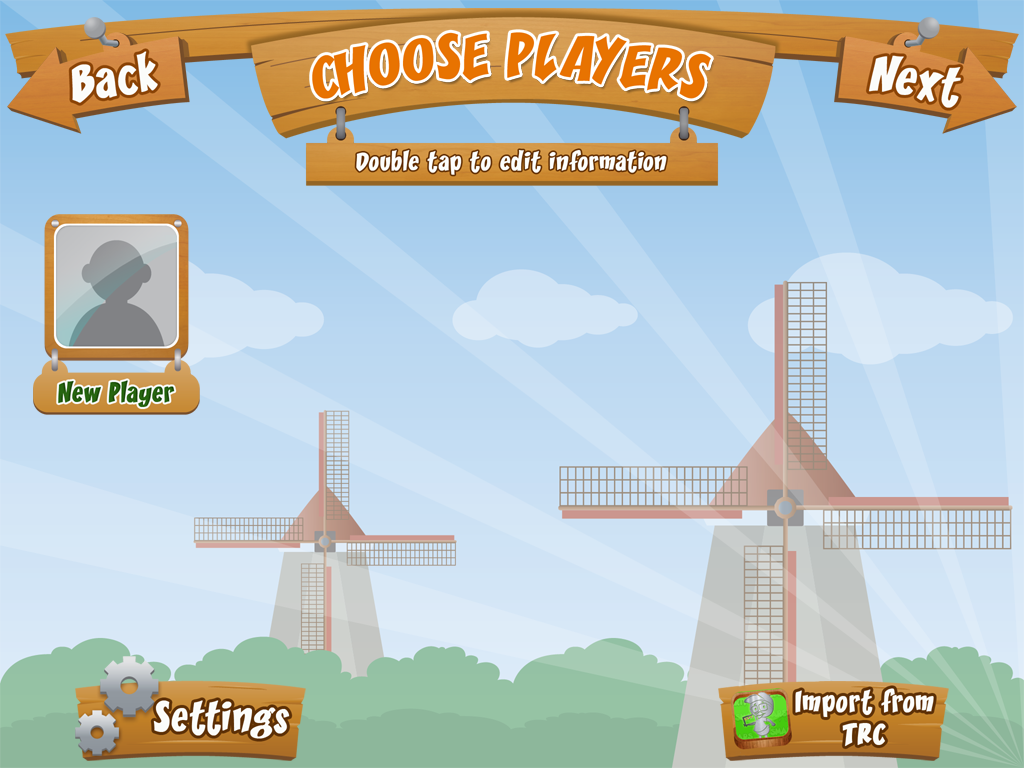
As with any new app, start by watching the video tutorial. Then, you're ready to add players. Touch "select player" to get started.
Next, you'll need to choose which of three areas you'd like to start with.
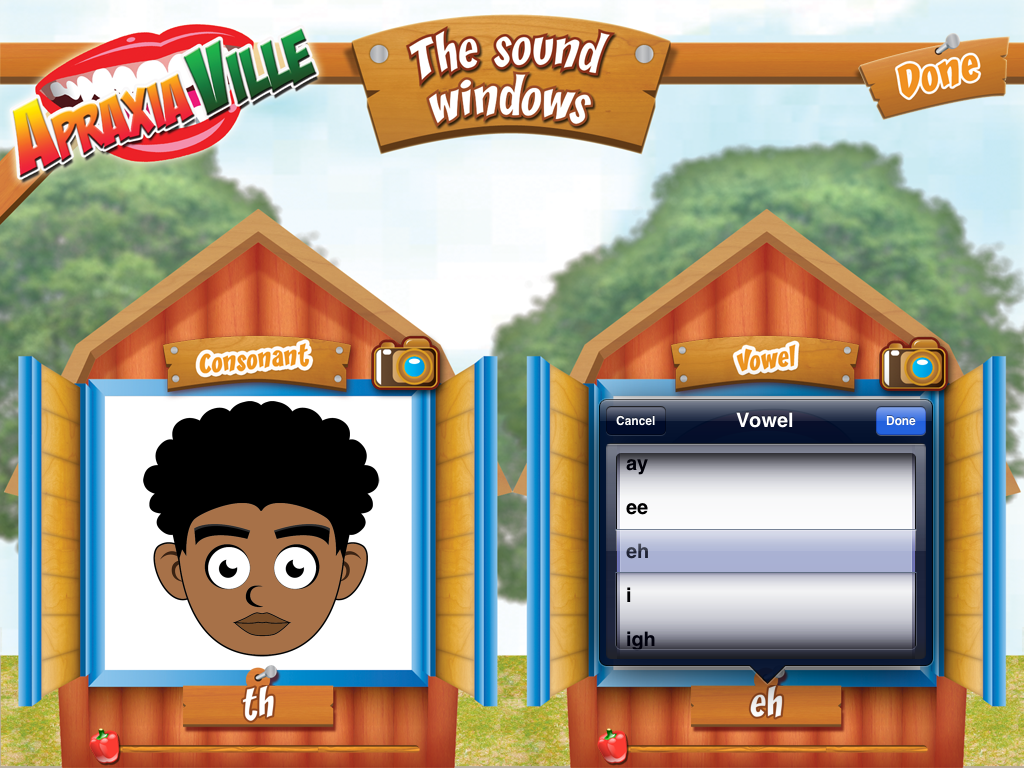
The first area is called, "The Sound Windows" and includes sound practice.
The window on the left includes video modeling of consonants and the window on the right includes video modeling of vowels. Simply click on the face to see how the sound is pronounced.
By tapping on the letters, you can change the sounds that are demonstrated in the windows.
The second area covered is, "The Farm House". Here, you are able to adjust the syllable structure and select specific sound groups (both consonants and vowels) to work on.
Syllable structures include:
- Level 1: CV & VC
- Level 2: CVC
- Level 3: CVCV
- Level 4: CCVC
- Level 5: Bisyllabic
- Level 6: Three syllables
- Level 7: Four syllables
Sound groups include:
- /p/, /b/, /m/
- /d/, /n/, /t/
- /g/, /k/, /h/
- /w/, /j/
- /f/, /v/
- /s/, /z/
- "sh", "ch", /dz/
- /l/
- "th"
- /r/
- /ng/
- diphthongs
- short a
- long a
- short e
- long e
- short i
- long i
- short o
- long o
- short u
- long u
Target words, based on your previous selections, show up at the barn doors for students to repeat. Data can easily be collected at the top of the barn. Simply tap on the appropriate student and touch the red, yellow, or green boxes to track incorrect, approximate, and correct responses. Students can also record their own productions in this section of the app to provide auditory feedback!
You can easily select homework for any sound(s) that you are working on. Homework can be emailed or opened as a PDF file.
Last, but certainly not least is data collection. You can track each student's results in the following areas:
consonant production,
vowel production,
syllable structure,
What I love about this app:
- it is extremely versatile - from practicing individual phonemes to combining multiple syllables, this app has it all!
- it provides individualized homework.
- it shows video modeling of all consonant and vowel sounds.
- "The Farm House" and "The Words Farm" includes an option to record and play back a student's own productions.
- it has extensively detailed data collection so that you can appropriately determine your students' specific needs.
What I'd like to see in an update:
- the video models in "The Sound Windows" could be a bit more precise, specifically, the /f/ sound.
You can check out this amazingly comprehensive apraxia app for $29.99 at the Smarty Ears Apps website or in iTunes!
Disclaimer: This app was given to me for review. No other compensation was provided.
This app is designed to be used with students who have childhood apraxia of speech and severe speech sound disorders. It includes video modeling of vowels and consonants, word targets divided into syllable structure (e.g. CV, VC, CVC), syllable combinations, and individualized homework assignments.
As with any new app, start by watching the video tutorial. Then, you're ready to add players. Touch "select player" to get started.
From here, click on "new player", enter each student's name, and choose an avatar.
Next, you'll need to choose which of three areas you'd like to start with.
The first area is called, "The Sound Windows" and includes sound practice.
The window on the left includes video modeling of consonants and the window on the right includes video modeling of vowels. Simply click on the face to see how the sound is pronounced.
By tapping on the letters, you can change the sounds that are demonstrated in the windows.
The second area covered is, "The Farm House". Here, you are able to adjust the syllable structure and select specific sound groups (both consonants and vowels) to work on.
Syllable structures include:
- Level 1: CV & VC
- Level 2: CVC
- Level 3: CVCV
- Level 4: CCVC
- Level 5: Bisyllabic
- Level 6: Three syllables
- Level 7: Four syllables
Sound groups include:
- /p/, /b/, /m/
- /d/, /n/, /t/
- /g/, /k/, /h/
- /w/, /j/
- /f/, /v/
- /s/, /z/
- "sh", "ch", /dz/
- /l/
- "th"
- /r/
- /ng/
- diphthongs
- short a
- long a
- short e
- long e
- short i
- long i
- short o
- long o
- short u
- long u
Target words, based on your previous selections, show up at the barn doors for students to repeat. Data can easily be collected at the top of the barn. Simply tap on the appropriate student and touch the red, yellow, or green boxes to track incorrect, approximate, and correct responses. Students can also record their own productions in this section of the app to provide auditory feedback!
The window cues on the side can be adjusted if needed to demonstrate correct production of the various sounds.
The third area, "The Words Farm" provides practice sets of words that can be combined together to make multiple word productions.
First, choose between two or three words.
Words will be generated based on your previous preferences.
However, you also have the option of changing the speech sounds that are targeted as well as the syllable structure.
Here, I've changed both the targeted speech sound and the syllable structure on the left side of the screen.
Data can easily be tracked on "The Words Farm" and students can again record their own productions.
Homework can also be generated in this app by selecting "Reports and Homework" on the home screen and then clicking on "homework" in the top, right hand corner.
You can easily select homework for any sound(s) that you are working on. Homework can be emailed or opened as a PDF file.
Last, but certainly not least is data collection. You can track each student's results in the following areas:
consonant production,
vowel production,
syllable structure,
and overall history!
- it is extremely versatile - from practicing individual phonemes to combining multiple syllables, this app has it all!
- it provides individualized homework.
- it shows video modeling of all consonant and vowel sounds.
- "The Farm House" and "The Words Farm" includes an option to record and play back a student's own productions.
- it has extensively detailed data collection so that you can appropriately determine your students' specific needs.
What I'd like to see in an update:
- the video models in "The Sound Windows" could be a bit more precise, specifically, the /f/ sound.
You can check out this amazingly comprehensive apraxia app for $29.99 at the Smarty Ears Apps website or in iTunes!
Disclaimer: This app was given to me for review. No other compensation was provided.
Subscribe to:
Posts (Atom)